In this guide
One of the most common questions about robot portraits is:
How many guests can Robo Portraits actually draw during my event?
The short answer is:
Plan on approximately 22 completed portraits per robot, per hour.
So, as a quick rule of thumb:
- 1 robot for 2 hours: about 45 portraits
- 2 robots for 2 hours: about 90 portraits
- 3 robots for 2 hours: about 130 portraits
Up to 3 robots can draw at one event, so add robots (up to 3), more time, or both, and capacity increases accordingly. Past about 130 portraits, the way to add capacity is more time, not more robots.
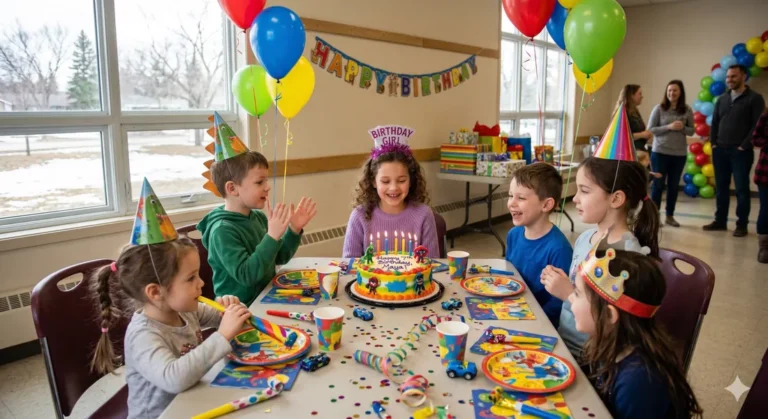
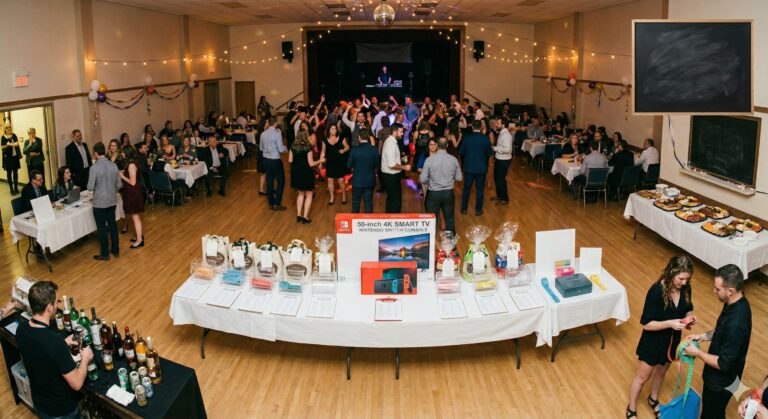
At larger events, you often don’t need enough capacity to draw every person who attends. A 500-person trade show where Robo Portraits is one of several activations is very different from a 15-child birthday party where you may reasonably want every child to leave with a portrait.
The right setup depends on your guest count, event length, expected participation and how guests will move through the event.
Here’s how to plan it.
Robo Portraits capacity at a glance
- 1 robot ≈ 45, 2 robots ≈ 90, 3 robots ≈ 130 portraits in 2 hours.
- Maximum 3 robots drawing at one event, plus a spare robot we bring along.
- About 1.5 minutes (simple style) or 2.5 minutes (detailed style) per portrait, including the photo.
- Extra time is $125 per robot per hour, in 30-minute blocks.
- Group portraits take longer, so tell us about them when you ask for a quote.
The simple formula
For most event planning, use:
22 portraits × number of robots × number of hours
For example:
2 robots × 3 hours × 22 portraits = approximately 132 portraits
This isn’t a guarantee that exactly 22 portraits will be completed every hour. Events aren’t assembly lines.
But it is a useful real-world planning number.
Why isn’t the number higher?
Each portrait takes about 1.5 minutes in the simple style or about 2.5 minutes in the detailed style, and those times already include taking the photo and processing it.
At those speeds, one robot’s theoretical maximum is about 40 portraits an hour (simple) or 24 an hour (detailed):
60 minutes ÷ 1.5 minutes = 40 portraits per hour
60 minutes ÷ 2.5 minutes = 24 portraits per hour
But the theoretical maximum isn’t the same as event throughput.
22 is a cautious planning figure. It allows for guests changing over at the station, a mix of simple and detailed style choices, and natural pauses from event to event.
That’s why we prefer to plan around realistic event throughput rather than theoretical maximum speed. See how it works for each step at the station.
How many robots do you need?
If you want capacity for approximately a certain number of portraits, this table gives you a quick starting point.
| Portraits wanted | 2 hours | 3 hours | 4 hours |
|---|---|---|---|
| 50 | 2 robots | 1 robot | 1 robot |
| 100 | 3 robots | 2 robots | 2 robots |
| 150 | Not possible in 2 hours — add time (3 robots for about 2.5 hours) | 3 robots | 2 robots |
| 200 | Not possible in 2 hours — add time (3 robots for about 3.5 hours) | Not possible in 3 hours — add time (3 robots for about 3.5 hours) | 3 robots |
| 300 | Not possible in 2 hours — add time (3 robots for about 5 hours) | Not possible in 3 hours — add time (3 robots for about 5 hours) | Not possible in 4 hours — add time (3 robots for about 5 hours) |
These numbers are based on approximately 22 portraits per robot per hour, with a maximum of 3 robots, and are rounded up.
But don’t automatically choose the row that matches your total attendance.
First ask:
How many guests are actually likely to participate?
Guest count and portrait count aren’t always the same
At a smaller birthday or private party, you may want nearly everyone drawn.
At a larger reception, conference or trade show, Robo Portraits may be one of several things happening at the event.
Some guests will be talking.
Some will be eating or dancing.
Some will arrive late or leave early.
Some may prefer to watch rather than participate.
So a 300-person event does not automatically require capacity for 300 portraits.
The better question is:
How many people do we want to be able to draw during the booking?
Example: a 100-person private event
Suppose you’re expecting 100 guests and Robo Portraits will operate for two hours.
Two robots provide approximately:
2 × 2 × 22 = 88, so about 90 portraits
If Robo Portraits is one of several activities, that may be plenty.
If getting virtually everyone drawn is important, three robots provide more breathing room:
3 × 2 × 22 = 132, so about 130 portraits
Same event. Different goal.
Example: a 250-person company event
Now imagine a company party with 250 attendees and a three-hour booking.
- 2 robots: about 132 portraits
- 3 robots: about 198 portraits
If you expect only part of the room to participate, two or three robots may make sense.
If you want the experience available to nearly everyone, add time rather than robots: 3 robots for 4 hours is about 264 portraits.
Example: a 500-person conference or trade show
Large events should usually be planned around the role of the activation rather than total registration.
If Robo Portraits is operating at a trade-show booth and the objective is to create steady traffic throughout the event, you may not need 500 portraits.
For example:
3 robots × 4 hours = approximately 264 portraits
If your objective is genuinely to offer a portrait to nearly every attendee, plan on more time. Trade shows can run up to 8 hours a day and over multiple days:
3 robots × 8 hours = approximately 528 portraits a day
The key is sizing the setup to the experience you’re trying to create.
More robots or more hours?
There are two ways to increase capacity:
Add robots (up to 3) or add time.
They aren’t always interchangeable from the guest’s perspective.
Three robots operating for two hours and two robots operating for three hours both provide approximately the same overall portrait capacity.
But the experience can be very different.
The price is the same either way: each extra robot adds $250 to a 2-hour package (trade shows are quoted separately), and each extra hour is $125 per robot. For example, for a kids’ birthday, 1 robot for 4 hours ($649 + $250 = $899) costs the same as 2 robots for 2 hours ($899). So choose based on how guests arrive. Every package and fee is on our pricing page.
More robots are useful when demand is concentrated
Consider adding robots when:
- most guests arrive around the same time;
- your event is relatively short;
- Robo Portraits is a major feature;
- you expect strong early demand; or
- minimizing waits is especially important.
More robots increase the number of guests who can be served at the same time.
More hours are useful when participation is spread out
Longer bookings can make more sense for:
- conferences;
- trade shows;
- open houses;
- longer receptions; and
- events where guests arrive throughout the day or evening.
In these situations, fewer robots operating for longer may provide plenty of capacity.
Guest flow matters as much as guest count
Imagine two events with 200 people.
At the first, almost everyone arrives during the same 30-minute window for a two-hour reception.
At the second, guests circulate through a conference exhibit area over six hours.
Same attendance.
Very different demand.
The first event benefits more from simultaneous capacity.
The second may benefit more from longer operating time.
That’s why we ask about how the event works, not just how many names are on the guest list.
What about lineups?
A small lineup isn’t necessarily a problem.
Watching the robot draw is part of the experience, so guests can gather around to see portraits develop and compare finished drawings.
But there is obviously a point where waiting becomes frustrating.
If a long line develops and the event is almost over, you don’t have enough remaining capacity.
For larger events, adding another robot (up to 3) can sometimes improve the experience more than simply extending the total booking.
Faster versus more detailed portrait styles
The simple style takes about 1.5 minutes per portrait, while the detailed style takes about 2.5 minutes, including the photo and processing.
If maximizing throughput is the main priority, a faster style may be the better fit.
If your event is smaller and detail matters more than volume, you may prefer a more detailed portrait.
That means the right setup isn’t determined by guest count alone.
You should also consider:
- portrait style;
- operating time;
- expected participation;
- event flow; and
- how important it is that nearly everyone gets drawn.
What about couples and group portraits?
Our standard capacity planning is based primarily on individual portraits.
If you’re expecting a significant number of couples, families or groups who want to be drawn together, tell us when requesting a quote.
Those drawings can affect timing differently from a standard individual portrait, so we don’t recommend assuming every group can simply be counted as one normal portrait slot.
For an event where maximum throughput is important, individual portraits are the easiest format to plan around.
Example participation scenarios — not expected participation rates
The table below is only a planning tool.
It does not mean Robo Portraits expects a particular percentage of your guests to participate.
Actual participation depends on the event.
| Event attendance | 50% participate | 70% participate | Nearly everyone participates |
|---|---|---|---|
| 100 guests | 50 portraits | 70 portraits | 90–100 portraits |
| 200 guests | 100 portraits | 140 portraits | 180–200 portraits |
| 300 guests | 150 portraits | 210 portraits | 270–300 portraits |
| 500 guests | 250 portraits | 350 portraits | 450–500 portraits |
A trade-show booth where Robo Portraits is a featured attraction may behave very differently from a wedding or company party where dinner, dancing and other activities compete for guests’ attention. At a wedding social, for example, the DJ, bar and raffles all compete for guests’ time.
Use these percentages to test scenarios—not as forecasts.
Four questions will usually tell us what you need
When you’re planning a booking, we want to know:
1. How many guests are attending?
Use your realistic expected attendance rather than the venue’s maximum capacity.
2. How many guests do you want to be able to draw?
Everyone?
Most people?
Or is Robo Portraits one activation among several?
3. How long will Robo Portraits operate?
Longer operating time means greater total capacity.
4. Is demand likely to be concentrated or spread out?
If everyone arrives together, additional robots become more valuable.
If guests circulate over several hours, fewer robots may be sufficient.
A quick way to calculate it yourself
Use:
Expected portraits ÷ 22 ÷ event hours = robots needed
Then round up.
For example, suppose you want capacity for 175 portraits over three hours:
175 ÷ 22 ÷ 3 = 2.65
Round up to:
3 robots
Approximate capacity:
3 × 3 × 22 = 198 portraits
That gives you some breathing room instead of planning right to the limit.
If the answer comes out above 3, add hours instead: expected portraits ÷ 66 = hours needed with 3 robots.
We would rather recommend the right number than the biggest package
More robots aren’t automatically better.
If two robots will comfortably handle your event, there’s no reason to use three.
Likewise, if several hundred guests are expected to arrive during a short window and getting as many people drawn as possible matters, trying to make one robot handle the entire event isn’t going to create a good experience.
Our goal is to match the number of robots and operating hours to the event you’re actually planning.
For current package options, see our Pricing page, or try the price estimator.
When requesting a quote, tell us:
- expected attendance;
- event type;
- desired operating time;
- roughly how many guests you’d like us to be able to draw; and
- whether guests arrive together or throughout the event.
From there, we can recommend a setup that makes sense.
The quick answer
If you remember one number, make it this:
Approximately 22 portraits per robot per hour.
Use that as your starting point, then adjust for expected participation and event flow.
That’s a much better way to plan Robo Portraits than simply matching one robot to a particular guest count. When you’re ready, check your date.
Frequently asked questions
How many portraits can one robot draw per hour?
Plan on about 22 portraits per robot per hour. At full speed one robot can draw about 40 an hour in the simple style or about 24 in the detailed style, but 22 allows for guests changing over, mixed style choices and natural pauses.
How many robots do I need for 100 guests?
For a 2-hour booking, 2 robots draw about 90 portraits and 3 robots about 130. If Robo Portraits is one of several activities, 2 robots are often enough; if you want nearly everyone drawn, choose 3 or add time.
Can you draw every guest at a 300-person event?
Yes, with enough time. Three robots, our maximum, draw about 66 portraits an hour, so about 300 portraits takes about 5 hours. In a 2-hour booking, 3 robots draw about 130.
Is it better to add robots or hours?
The price is the same either way: each extra robot adds $250 to a 2-hour package and each extra hour is $125 per robot (trade shows are quoted separately). Add robots if guests arrive together, and add hours if they arrive over a longer time.
Do group portraits take longer?
Yes, they can. Our planning figures are for individual portraits, so if you expect many couples, families or groups, tell us when you ask for a quote.